The OneStream Community is temporarily frozen until June 29th due to the ongoing maintenance. Please read the blog post here to learn more.
Forum Discussion

NickKroppe OneStream Employee
2 years agoOneStream EmployeeSolution to Update Task Scheduler Start Times to Account for Daylight Savings
Hi,
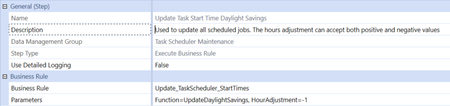
This time of year we have the common maintenance point regarding needing to update task scheduler start times to account for daylight savings. It is expected for the platform to not automatica...

denisefockler
2 years agoContributor
NickKroppe I stumbled across your post here as once again we find ourselves in this predicament - always fun. Of course I will test this first but I am curious about one item. Example: my tasks that are scheduled for 8:30 am and are showing on the task scheduler calendar as 8:30am are kicking off at 9:30 am due to the time change over the weekend. Therefore, how they look on the calendar is correct but they are just kicking off at a time inconsistent with how they show on the calendar. Will running the DM jobs you have attached, change how they look on the task scheduler calendar? I do not want to change the time they are showing as on the calendar. I just want to sync they time they are kicking off with how they are showing on the calendar. Does that make sense?
Thank you
Denise

JackLacavaOneStream Employee
2 years agoOneStream EmployeeI wonder if restarting the system would make them look consistent with when they actually start. I fear the inconsistency might come from something in the presentation layer not picking up that the switchover happened.
Related Content
- 9 months ago
- 2 years ago
- 2 years ago
- 2 years ago