How can I retrieve the name of the form template using a finance business rule?
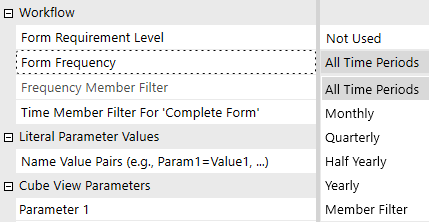
Hello everyone, Thanks to this discussion: https://community.onestreamsoftware.com/discussions/WorkflowDI/forms-by-entity/13417 I can now show or hide the input cube views based on whether or not the group entity has been released, as stored in Entity Text6. However, by doing this, I lose the ability to display cube views only for the quarter, half-year or full year. Currently, I display the cube views every month if the entity is present in the group, so this does not apply to cube views that should be displayed quarterly. I would therefore like to retrieve the name of the form displaying each data entry cube view, so that I can define in the Business Rules whether each form should be displayed monthly, quarterly, half-yearly or only in December. This would allow me to use the settings provided natively by OneStream, which I have previously bypassed. But I am unable to do so. Is this feasible? The ultimate aim is to prevent accidental data entry into workflows that should no longer be populated. I have already removed accountants’ access to the workflow for entities that have left the group, but the central team still has access, and I would like to prevent them from accidentally entering data for periods when the entity has left the group. Thank you for your help24Views0likes3Comments
DynamicCalc - Return FX of Current Parent
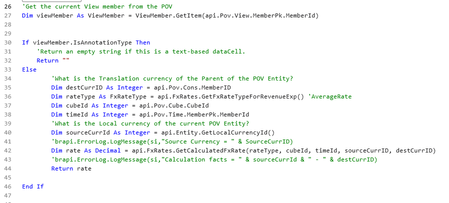
Good morning OneStream folks. I was looking for an example of how to dynamically pull the FX rate for an entity based on its current parent. We currently have a DynamicCalc account that assumes that all parents are USD and therefore the rate returned by the account is the USD translation rate. For example, the child is GBP and has a CAD parent, but the formula returns GBP-->USD. I was able to get a DynamicCalc formula that works, but I have to make some additions in my QuickView or CubeView to get it work completely. The account I created in this case is called ParentFX and the logic is below: In order to get the ParentFX account to return the correct value, I have to write my quickview logic as: A#ParentFX:C#Translated:Name(Parent FX). Which is fine, but I would also like to use that combo in a getdatacell calculation, and OneStream doesn't seem to like that. I'd like to be able to pull the A#ParentFX account with it using the Entity hierarchy as its guide for the parent FX instead of having to use the Cons hierarchy. Any ideas are appreciated.52Views0likes0Comments
OneStream - Piece by Piece
The core learning comes from first understanding the OneStream artifacts (the individual objects or components that make up the platform). A combination of these artifacts completes your application or solution (used, for example, to consolidate or plan). Or take advantage of OneStream’s solution exchange portal where there are numerous use cases that have the artifacts already pieced together readily available to download. Like any jigsaw puzzle, the box cover has the whole picture so you can see what the result will look like. Once opened you can lay out all the pieces on the table and study each individual tile to understand where each one fits in the bigger picture. Here is OneStream’s front cover of some of the artifacts: Here are the main pieces now laid out on the table: Dimensions : Classed as metadata, these are a set of related members. Each member in a dimension is an item name that labels, so to speak, the data it represents. So, if our dimension has been called Fruit, the members inside it could be named Oranges, Apples, Grapes, and Peaches, and the data for each item could point to unit sales. Dimensions are built per dimension type as follows: Entity Dimension: The organization’s business areas used for statutory or management reporting. Scenario Dimension: A version of data that can reflect various Scenario Types such as Actual, Budget, or Forecast. Account Dimension: The structure representing the organization’s chart of accounts, both financial and non-financial members. Flow Dimension: Set up to provide the movements and details on how account values change over time. User Defined (UD) Dimension: The ability to create hierarchies that can be used to analyze a report further, such as products, regions, or cost centers. Parent: Resides within the Entity dimension and provides the mechanism to further break down an entity’s business area. Intercompany: Determines which entities within the Entity dimension trade in the group and are involved with intercompany activity. Time Dimension: Data can be stored and reported at weekly, monthly, quarterly, half-yearly, and yearly levels. Consolidation Dimension: Provides the analysis of rolled-up data from its local currency to translation, share, elimination, adjustments, and final value in the parent entity’s member. Origin Dimension: Identifies the data’s origin with an import, form entry, or journal adjustment. View Dimension: Shows the data from different perspectives, for example, year-to-date, month-to-date, or quarter-to-date. Cube: A collection of relevant dimensions to form a multi-dimensional financial model that has data for analyzing and reporting. FX Rates: The currency codes used for currency exchange rates. Import: A mapping setup of the source file to the target cube for the purpose of loading data. Forms: A manual (or import option if required) way of entering data into sheets for the purpose of collating values. For example, headcount. Journals: Adjustments to the loaded data, providing governance of when and who performed the adjustment. As well as manually creating the journal, there is also an import feature that is able to create the journal using an Excel or Comma Separated Values file. Transformation Rules: The rules behind which source items map to which target items. Confirmation Rules: A developer-built data quality check feature to prevent continuation of the workflow until all is acceptable. For example, the balancing of a balance sheet. Certification Questions: Use of a questionnaire to sign off on data as acceptable. Cube Views: The main building blocks for reports and dashboards, used to display and/or enter cube data. Dashboards: Developers design dashboards to display data in a user-friendly manner and can set them to be an end-user’s landing page, Workspace in a workflow, or a series of guided reporting selections. Spreadsheets: A spreadsheet workbook directly connected to OneStream data that can be displayed and updated in real time. Report Books: A combination of different report types to form a report pack that can be distributed to stakeholders. Extensible Documents: A blend of OneStream content with Microsoft content that references OneStream data. Workflow: A guided approach for users to complete specific assigned tasks at specific times. Security: A way to permit users to only access objects relevant to their tasks in OneStream The OneStream fundamentals book extends further on all the above pieces and is the concise starter guide for anyone new to corporate performance management and specifically the OneStream world. It will take you through OneStream’s journey that will be your road map to understanding the platforms metadata, data import, calculations, workflow, reporting topics and much more … Enjoy!352Views6likes0Comments
Automatically Flag Cells for Spreading in Cubeview
Hello, Currently we are working on a forecasting model, and we would like to be able to use the spreading process inherent in OS. Is there away to use conditional formatting or an XFBR to set a column of values to be flagged automatically based on the comparison between a parameter and the column member? Specifically, I am looking to have the first or first two periods of the quarter set as flagged so they can be excluded from the proportional distribution based on when the users are completing this forecast. Thanks,62Views0likes2Comments
Pass-thru Formatting on Cube Views
Good afternoon, I'm trying to pass through formatting from one cube view to another. The 2nd cube view is a dialog pop-up in a dashboard triggered by a selection changed event. So far I've been able to determine destination formatting based on Cell POV dimension members of the cell "clicked" but I'm hitting a snag on dynamically calculated cells (column is Actual versus Budget % for example). The Cell POV dimension members are the same with the only difference being a "GetDataCell" at the end. I haven't figured out a way to retrieve what, if anything, is in the "calculation script" for a cell intersection. Or if there's a way to retrieve the row and column names for a cell intersection at the time of a click? Looking for any guidance possible. Thanks, Brandon38Views0likes0CommentsTime always returns 0001-01-01 in BR when using XFBR in Cube View
Hi, I am calling a Business Rule (BR) in a Cube View using XFBR as follows: XFBR( BR_ParamHelper, FunctionName, WFname = |WFText2|, SelectEntity = |!WF_AssignedEntity!|, Time = |!Time!| ) Inside the BR, I parse the year from Time to control flows: Dim wfYear As Integer = 0 If args.NameValuePairs.ContainsKey("Time") Then Dim POVTime As String = args.NameValuePairs("Time") wfYear = CInt(Left(POVTime, 4)) End If If wfYear >= 2026 Then ' Remove flows for specified entities Else ' Keep historical flows End If Problem: When I log POVTime or wfYear, it always shows 0001-01-01, so my logic for removing ENT/EXIT based on the year never triggers. What I have tried: Verified the Cube View POV is correctly set. Passed Time = |!Time!| from the Cube View XFBR call. Logged args.NameValuePairs("Time") — still returns 0001-01-01. Question: Is Time = |!Time!| the correct way to pass the POV period to a BR? Is there a difference between |!Time!| and |!POV!| or T#POV in Cube Views for BRs? How can I get the actual workflow year in the BR so I can apply logic like wfYear >= 2026? Any guidance or examples on how to correctly get the year of the workflow/POV in a BR would be greatly appreciated.Solved90Views0likes5CommentsVary description vy user culture in XFBR
Hello, We are facing the following issue, we use the following xfbr to generate accounts in a cubeview rows and retrieve descriptions : XFBR(CCF_XFBR, GetCCFDrillDownWithDescription2,memberExp=[A#CashFlow_Gestion.TreeDescendantsInclusive], Time=|CVTime|). However, the Cube View where this XFBR is applied always displays the descriptions in the default format. The description does not adapt based on the user’s culture settings. How can we make the XFBR return descriptions that vary according to the user culture? For reference, here is the XFBR code : Public Function GetCCFDrillDownWithDescription2(ByVal si As SessionInfo, ByVal globals As BRGlobals, ByVal api As Object, ByVal args As DashboardStringFunctionArgs) As String Try 'Get the Dim PK for Entity Dimension Dim accountDimPk As DimPk = BRApi.Finance.Dim.GetDimPk(si,args.SubstVarSourceInfo.WFAccountDim) Dim flowDimPk As DimPk = BRApi.Finance.Dim.GetDimPk(si,args.SubstVarSourceInfo.WFFlowDim) 'Dim memberListClass As New OneStream.BusinessRule.Finance.CCF_FinanceLogics.MainClass Dim memFilterAccounts As List(Of MemberInfo) = BRAPi.Finance.Members.GetMembersUsingFilter(si, accountDimPk, args.NameValuePairs("memberExp"), True) If memFilterAccounts.Count = 0 Then ' brapi.ErrorLog.LogMessage(si,"Cash flow Account Member Not found in CubeView member filter. Check XFBR syntax (GetCCFDrillDown) in Cube view") Return "A#None:F#None:Name(Please check memberfilter in cubeview. Cashflow Account not found)" End If 'Use a text builder to build a string Dim resultString As New Text.Stringbuilder() Dim isfirstItem As Boolean = True ' Dim accountFlowComb As String ' Dim flowBaseMembers As List(Of Member) Dim objDataCellInfoUsingMemberScript As New DataCellInfoUsingMemberScript Dim tftEntityID As Integer = Brapi.Finance.Members.GetMemberId(si,dimTypeId.Entity, "CF") Dim objScenarioType As ScenarioType = BRApi.Finance.Scenario.GetScenarioType(si, args.SubstVarSourceInfo.WFScenario.MemberId) Dim timeReference As String = BRApi.Finance.Entity.Text(si, tftEntityID, 1, objScenarioType.Id, args.SubstVarSourceInfo.WFTime.MemberId) Dim MatrixTime As String = args.NameValuePairs("Time") Dim scenarioReference As String = BRApi.Finance.Entity.Text(si, tftEntityID, 2, objScenarioType.Id, args.SubstVarSourceInfo.WFTime.MemberId) If scenarioReference = String.Empty Then scenarioReference = args.SubstVarSourceInfo.WFScenario.Name Dim cashFlowSettings As DataTable = BRApi.Import.Data.FdxExecuteDataUnit(si, "PARAM_CF", "E#CF", "Local", objScenarioType.Id,"S#" & scenarioReference, "T#" & MatrixTime, "YTD", True, "Amount <> 0", 4, False) 'Dim cashFlowAdj As DataTable = BRApi.Import.Data.FdxExecuteDataUnit(si, "CONSO", "E#CF", "Local", objScenarioType.Id,"S#REEL","T#" & timeReference , "YTD", True, "Amount <> 0", 4, False) 'Exit Function Dim CFSiN As Boolean = cashFlowSettings Is Nothing If cashFlowSettings Is Nothing Then Brapi.ErrorLog.LogMessage(si,"No CashFlow setting found") Return "" 'Exit Function ElseIf cashFlowSettings.Rows.Count = 0 Then Brapi.ErrorLog.LogMessage(si,"No CashFlow setting found") Return "" 'Exit Function End If Dim space As String = String.Empty Dim sign As String = String.Empty Dim AccountDescription As String ' Dim AccountDescription2 As String For Each account As MemberInfo In memFilterAccounts ' brapi.ErrorLog.LogMessage(si,"account " & account.NameAndDescription) space = " " For i = 0 To account.IndentLevel space = space & " " Next 'Exit Function resultString.Append("A#" & account.Member.Name & ":Name(" & space & account.Member.NameAndDescription & "):F#None,") 'resultString.Append("A#" & account.Member.Name & ":Name(" & space & account.Member.NameAndDescription & "):F#None:U7#MT_RETTFT,") ' Cb#CONSO:E#EIMER:P#?:C#Local:S#REEL:T#2022M12:V#YTD:A#RD_T110:F#None:O#Top:I#Top:U1#None:U2#None:U3#Top:U4#None:U5#None:U6#None:U7#MT_RETTFT:U8#CF_CalcAmount 'Ajout des ecritures Dim memberFilter As String = "MT_RETTFT" Dim UD7Desc As String = BRApi.Finance.Metadata.GetMember(si, dimTypeId.UD7,memberFilter).Description 'ResultString.Append("A#" & account.Member.Name & ":Name(" & space & account.Member.NameAndDescription & "):F#None:U7#MT_RETTFT:Name(" & UD7Desc & "),") If Not BRApi.Finance.Members.HasChildren(si, accountDimPk, account.Member.MemberId) Then Dim cashFlowSettingRows() As DataRow = cashFlowSettings.Select("UD7 = '" & account.Member.Name & "' AND UD8 = 'None'") For Each row As DataRow In cashFlowSettingRows AccountDescription = BRApi.Finance.Metadata.GetMember(si, dimTypeId.Account,row("Account")).NameAndDescription If row("Amount") = -1 Then sign = "(-)" 'ResultString.Append("A#" & row("Account") & ":Name( "& space & " " & AccountDescription & "):F#" & row("Flow") & ":U7#" & account.Member.Name &",") 'ResultString.Append("A#" & row("Account") & ":Name( "& space & " " & AccountDescription & "):F#" & row("Flow") & ":U7#" & row("UD7") &",") ResultString.Append("A#" & row("Account") & ":Name( "& sign & space & AccountDescription & "):F#" & row("Flow") & ":U7#" & row("UD7") &",") Next ResultString.Append("A#" & account.Member.Name & ":Name( " & space & account.Member.Name & space & UD7Desc & "):F#None:U7#MT_RETTFT:U8#None" &",") 'ResultString.Append("A#" & account.Member.Name & ":Name(" & space & account.Member.NameAndDescription & "):F#None:U7#MT_RETTFT:Name(" & UD7Desc & "),") End If Next Return resultString.ToString Catch ex As Exception Throw ErrorHandler.LogWrite(si, New XFException(si, ex)) End Try End FunctionSolved248Views0likes4CommentsRetrieve the culture in a BR and display the name & description of this culture
Hello everyone, We currently have a business rule that allows us to display a certain number of accounts for our cash flow cube view. The problem is that when returning account.Member.NameAndDescription, it does not take into account the user's culture. resultString.Append("A#" & account.Member.Name & ":Name(" & space & account.Member.NameAndDescription & "):F#None,") So I think I need to retrieve the culture of the user displaying the cube view in my BR in order to return the correct name and description. However, I don't know how to retrieve the user's culture, nor what parameter to return instead of account.Member.NameAndDescription to get the one in US English, as the default is in French. Do you have any ideas?Solved56Views0likes1CommentDynamic calc
Dynamic calc formula for an account Dim RATE As DataCell = api.Data.GetDataCell("A#RATE:F#99:U7#Top") Dim CALC As DataCell = api.Data.GetDataCell("A#CALC:F#F99:U7#Top") If api.Pov.Entity.Name <> "None" And api.Entity.HasChildren() Then If RATE.CellAmount < 0.15 api.Data.Calculate("RATE = 0.15 * RemoveZeros(CALC)") Return RATE Else Return 0 End If End If i'm calling A#RATE from the cube view. i have error unable to execute the formula for member RATE, error in processing script. when i compile the formula no issueSolved96Views0likes1Comment
Real-time "Unsaved" status, Intercepting Workflow Navigation
I have a requirement to implement data integrity guardrails on several budgeting forms (Dashboards containing Cube Views/SQL Table Editor). I am looking for guidance on whether the following two features are technically feasible within OneStream: 1. Real-Time "Unsaved Changes" Indicator The goal is to display a status label at the top of the Dashboard that updates to "Data Hasn't Been Saved" the moment a user modifies a cell value (Cubeview/SQL Table Editor), before they actually click the Save button. Question: Is there a way to detect a "dirty" cell state or user input in real-time to update a dashboard component immediately, or are we limited to updating status only after a Save action is triggered? 2. Navigation Warning (Popup on Exit) The goal is to trigger a popup warning if a user attempts to navigate away from the current Workflow Unit or close the Dashboard tab without having Saved or Run Calculations. Question: Is there an event handler available that allows us to intercept a navigation event, and potentially block the user from leaving the screen until they complete the required actions? If anyone has implemented a similar solution or knows which Business Rule events controls these interactions, I would appreciate the insight. Thanks!23Views0likes0Comments