Excel Add In
311 Topics
The report displays data for the developer but remains blank for other users.
Issue Description: The report displays data correctly for the user who developed it. However, when accessed by other users, the report appears blank and does not return any data. The following validations have been performed: The affected user has Administrator security access. Access to all dimensions used in the report, including the Cube View report, has been granted to Everyone. Relevant data is available for FY2027. Despite the above validations, the report continues to display data only for the developer and remains blank for other users. Further investigation is required to identify the root cause. Attached the screenshots for reference. Kindly suggest a workaround. Thanks!48Views0likes2Comments
Excel Addin - Calculate
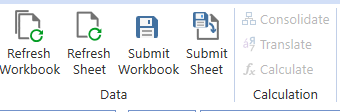
Hi, I am using OneStream version 8.2 and the Excel Add-In with a workbook that contains XFGetCell formulas. The workbook retrieves data successfully, and Refresh Workbook works as expected. However, the Calculate, Translate, and Consolidate buttons in the OneStream ribbon are disabled (grayed out). I am logged in successfully and can retrieve data through XFGetCell formulas, but I cannot perform any processing actions from Excel. Could anyone help me understand: What conditions must be met in OneStream 8.2 for the Calculate, Translate, and Consolidate buttons to become enabled? Is there any way to trigger Calculate, Translate, or Consolidate from Excel when working with XFGetCell-based templates? Thank you!57Views0likes1Comment
Excel Add-in - Quick view - Style for dates
Hi everyone ! We'd like to recover data in a date format using Quick Views. First step is to setup a CubeView that can recover this data. To do so, the CubeView setup is done in "Cell Type = Date " in the Data tab of the given line on the CubeView definition. Then data can be correctly input in the CubeView: . This particular date is saved as 639,160,344,000,000,000 (numeric value) in the data base. Next step it to recover this data using the quickview, but I can't get the correct style. It seems that the data in Onestream is different to that of the Excel date style (Excel starts from 1/1/1900 as day 1). Does anyone know how to properly set up the style to recover dates using a QuickView? Thank you Carlos15Views0likes0Comments
Excel Add-in and Task Activity Log
Hello, I'm responding to audit requests regarding user task activities and found an active user which has no task activity logged. The user uses the Excel Add-in. What Excel activities are/aren't recorded on the Task Activity log? Is there a way to capture the Excel activities? Thanks!47Views0likes1CommentSubmitting zero in excel
I am trying to submit zero via excel add-in using XFGetCell formula into MTD/periodic view. Excel/Spreadsheet does not seem to allow it. I can put in zero into the same POV via a data form. The only workaround I have is to submit a 0.0001 record into OS via excel XFGetCell formula instead. Is there any proper change in setting that would allow me to do this?Solved116Views0likes3CommentsLoading a Journal Excel Template into Multiple Periods
Hi, is there syntax similar to forms to load journals into multiple wf periods? My WF is 1 period, 12 months: I tried using similar syntax to form loads: Template set up as monthly: And I return no messages when I load. Confirmed xfj range is set up on file and all dimensions match. Thinking maybe its my "Time" thats preventing the journal from getting into the system and want to confirm I have valid syntax. Maybe the other option is to set Workflow Time to 2026M1 and make individual journals for each period: Is it possible to do all months in 1 journal?Solved64Views0likes1Comment
OS V9 Excel Add-in Parameters Feature
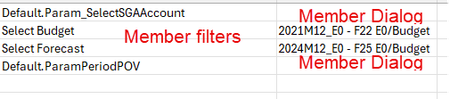
Hi all, I've been playing with this feature for a bit and it would appear that if you've made a cube view connection to a CV that contains parameters based on "Member Dialog", those parameters don't seem to work as expected. The resulting worksheet does create a space for those parameters but in the cell where you would select your member, there is no dropdown available to open and choose. The cell is completely blank. Upon refresh, I am prompted for those member dialog parameters but even the result I choose is not returned to display on the sheet. Doesn't seem to be any issues if the parameter is based on a Member Filter. Am I doing something wrong or is the use of Member Dialog parameters in Excel add-in simply not possible? There is nothing in the existing documentation that I can find that discusses this. Attaching a screen capture of the Excel results:138Views0likes1CommentSpreadsheet via Browser dashboard (OnePlace)
Hello everyone, I am currently working on OneStream v9.2 and trying to set up Ad Hoc reporting in the Web version (OnePlace). Context: I created a Dashboard with a Spreadsheet component exposed in Web (under OnePlace Dashboard). The connection to existing, preconfigured Cube Views is working correctly. Issue: In the Browser version, I do not have access to Quick View / dynamic POV features like in the Spreadsheet WinApp (Excel Add-in). I cannot find the option to perform free-form Ad Hoc analysis (changing axes, selecting members dynamically, etc.). Question: Is this a standard limitation of the Web version (OnePlace) in v9.2? Is there a specific configuration that enables a Quick View–like behavior in Web? Thank you in advance for your feedback and experience.Solved94Views1like1Comment