The OneStream Community is temporarily frozen until June 29th due to the ongoing maintenance. Please read the blog post here to learn more.
Spreadsheet
35 Topics
Create Excel spreadsheet from Business Rules
Does anyone know if you can create an Excel spreadsheet from Business Rules? I do not mean a csv file - I need to create multiple sheets. The OpenXMLBuilder object doesn't seem to have anything with writing files. I don't want to use a third-party object as that would require an installation or download. Thanks for any suggestions.Solved14KViews0likes31Comments
TableView - Setting data type to TableView columns
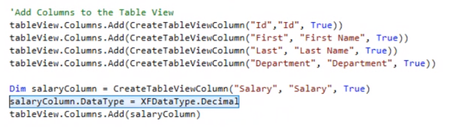
Hey all, I'm struggling to figure out how to define a TableViewColumn to be of type Decimal instead of the default type being Text. I'm in the section where I create a TableViewRowHeader and adding TableViewColumns to it. I can create a new column: Dim myTableViewColumn As New TableViewColumn myTableViewColumn.Name = "Col1" But when I try to set the type to this column, I get an error " Input string was not in a correct format." when trying to retrieve the table: myTableViewColumn.DataType = XFDataType.Decimal Is this syntax correct? I'm assuming that it's in the column definition where I should be defining the datatype but now not so sure. Hopefully someone can point me in the right direction. As a side note, page 15 in the Table Views User Guide makes reference to a function called CreateTableViewColumn. Is this a custom function or part of the OS library. The compiler doesn't recognize this function.Solved6.5KViews0likes13CommentsGet selected value from Combo Box and use it in a Table View
I have a dashboard that has 2 components,. 1. A Combo Box that is populated with a sql query in a Bound List Parameter. 2. A Spreadsheet that is populated with a Table View. The table view is generated using a Spreadsheet Business Rule. How do I pass the selection from the combo box to the table view? Thank you for any suggestions.Solved4.7KViews1like7Comments
Can you add records to a table via an Excel Table View?
Hi everyone, I am trying to add records to a table via an Excel Table View. Using the example in the Table Views documentation, I am able to update existing records; however, any new records added are cleared once I submit the sheet. Is there additional code I can add to allow the Table View to write new records to the table? Thanks! MollySolved4KViews1like4Comments
Create CSV FILE
Hi Everyone. I am creating a CSV file with the information from a datatable. The problem is that it generates the file with the columns but without the datatable information. I wanted to know if there is another way to create a CSV file correctly. Dim strFilePathFull_AllocationDetails As String = strFilePath & "/" & strModelName & "_" & strScenarioName & "_" & strTimeName & "_" & dtAllocationDetails.TableName & ".csv" Dim xfeFile_AllocationDetails As XFFileEx = dtbSH.DataTableToFile(si, dtAllocationDetails, strFilePathFull_AllocationDetails, Nothing) And my function: Public Function DataTableToFile(ByVal si As SessionInfo, ByVal dt As DataTable, ByVal strFilePath As String, ByVal listColToSkip As List(Of String), ByVal Optional strSeparator As String = ",") As XFFileEx Dim strDt As String = Me.PrintDataTable(si, dt, strSeparator, 0, False, listColToSkip, """") Dim bytes() As Byte = System.Text.Encoding.UTF8.GetBytes(strDt) Dim fileinfo As New XFFileInfo(fileSystemLocation.ApplicationDatabase, strFilePath) Dim xfFile As New XFFile(fileinfo, String.Empty, bytes) BRApi.FileSystem.InsertOrUpdateFile(si, xffile) Dim xfeFile As New XFFileEx(xffile, DataAccessLevel.AllAccess, False) Return xfeFile End FunctionSolved3.4KViews0likes5Comments