Narrative Reporting Parameters
I'm currently using the Narrative Reporting MarketPlace Solution on OS version 8.4 and have successfully integrated Cube Views, Content, and other artifacts using QuickParts. However, I'm facing several challenges: Member Prompts on Report Checkout/Edits: Despite configuring parameters at both the report and report group levels, I continue to receive member prompts from the cube view every time I check out or modify a report. This differs from the expected behavior in guided reporting and dashboards, where parameters are supplied automatically. Is this expected, or is there a workaround to prevent these prompts?328Views7likes1Comment
Narrative Reporting
I am trying to move a Narrative Report book from one environment to another and am struggling to do so without having to re-build it. Is there anyone on this Community that has managed to do so successfully? Would truly appreciate the steps you followed to get this done successfully.427Views2likes3Comments
Report Books - If Statement
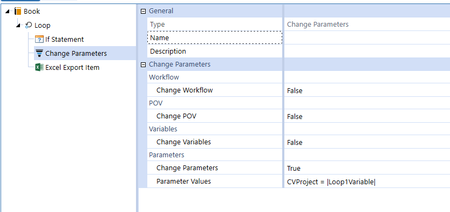
Hi There, I am trying to create a book with a loop on our UD4 (project). I have it working but I want to add an IF statement to filter out tabs that contain no data. Referencing a previous post, I tried adding an IF statement to filter out an account (A#TotSGA in our case). This is the statement I am using, but it doesn't seem to work. XFCell(Cb#00_CorpRpt:E#7420:C#Local:S#Budget_V2:T#2024:V#Periodic:A#OtherSGA:F#EndBal:O#Top:I#Top:U1#Top:U2#Top:U3#Top:U4#|Loop1Variable|:U5#Top:U6#Top:U7#None:U8#None) <> 0.00 I have attached screenshots and referenced the previous topic below. Any help is appreciated! Re: Suppress NoData Tabs in Book Using Loop - OneStream Community (onestreamsoftware.com)1.8KViews2likes11Comments
BI Viewer component in Powerpoint extensible document
Hello, Does anyone have experience linking a dashboard chart built with BI Viewer in Powerpoint via alt text? We tried including it as a BI Viewer or Chart component, but the chart does not appear in the Powerpoint. {XF}{Application}{BI Viewer}{MyComponentName}/{XF}{Application}{Chart}{MyComponentName} PageNumber=1, CropLeft=0, CropTop=0, CropWidth=0, CropHeight=0, Zoom=100, MaintainAspectRatio=True, FillMode=Width, Anchor=TopLeft, IncludeBorders=False Much appreciate it if anyone could share some tips!1.9KViews2likes2Comments
Genesis cannot start: "Value cannot be null."
Hi What to do when I get this error messages in Genesis: Unable to open dashboard 'OpenPlace_(Designer)'. Error processing DataSet 'GetWFSteps'. Error executing Workspace Assembly Service class 'Workspace.Gen.CubeViewCharts_x2x.MUAssemblyFactory'.Value cannot be null. (Parameter 'reader'). How to reset? The problem happens when working with Block: Cube View Charts. It will not read my cube view and give the following comment: Value cannot be null. An error messages that is difficult to work with, as it does not say where the problem is. But this second, as I cannot get into the genesis instance.37Views1like2Comments
Narrative Reporting Issue
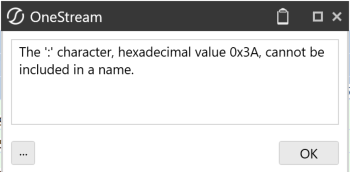
Hello! Has someone tried Narrative reporting in 9.1 version? I am currently experiencing issues: 1.- Inserting charts/Advanced Charts / Reports if someone could insert an exaple on how they have done it. 2.- I cannot vie the artifacts and acces them, this message keeps popping up (and the names are fine) Thank you so much for the help!!190Views1like2Comments
Entensible Finance ( Not enough memory)
Good Afternoon, I am trying to save an offline file in onstream retrieve and I am getting this error. Not enough memory resources are available to complete this operation. (Exception from HRESULT: 0x8007000E (E_OUTOFMEMORY)) Has anyone had this issue1KViews1like5Comments
Extensible documents - reports
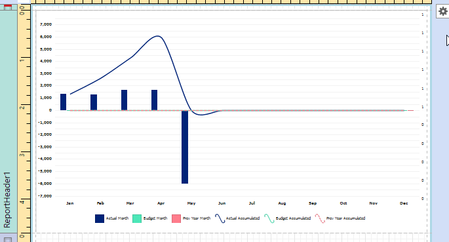
Hi everyone, I want to retrieve a report component into my PowerPoint, using the extensible documents and the Alt Text functionality of PowerPoint. I have created a graph within a report component. As you can see in the picture below, I have created the graph within the ReportHeader1 section of the report, and it shows data when it's run. However, when I open the extensible document PowerPoint, it just shows a black window. The picture has the following Alt Text: {XF}{Application}{Report}{Development} PageNumber=1, CropLeft=0, CropTop=0, CropWidth=0, CropHeight=0, Zoom=100, MaintainAspectRatio=False, FillMode=Height, Anchor=TopLeft, IncludeBorders=False, IncludeReportMargins=False, IncludeReportHeader=False, IncludeReportFooter=False, IncludePageHeader=False, IncludePageFooter=False. This is the outcome: Any help would be much appreciated. Thanks! Kind regards, Floris van der PoelSolved2.7KViews1like2CommentsExtensible documents - Chart component does not show data in PowerPoint
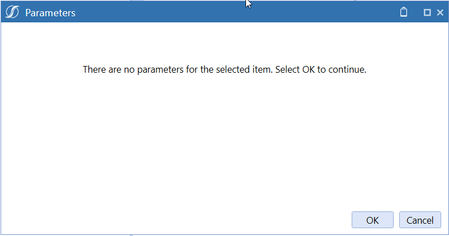
Hi everyone, I am trying to retrieve a Chart (Advanced) in my PowerPoint presentation, making use of the Alt Text functionality and extensible documents. The chart component works perfectly fine in OneStream. I can see the chart and correct the data. However, when I open the PowerPoint containing a picture with the Alt Text, I get the following message: The message prompts that there are no parameters for the selected item. However, my data adapter is linked to a cube view, which has an entity selection parameter in the cube view POV. When I click 'OK', the PowerPoint opens, but the chart area is empty. When I hardcode the entity in the cube view that is used as a source for the data adapter, I get the exact same error message, but the chart area is populated with data. Therefore, I think I'm doing something wrong with the parameter settings of the Chart (advanced) component. However, I cannot figure out what I'm doing wrong. Any help would be very much appreciated. Thanks, FlorisSolved4.3KViews1like7Comments