Recent Discussions

Issue in adding data to LIM WF model
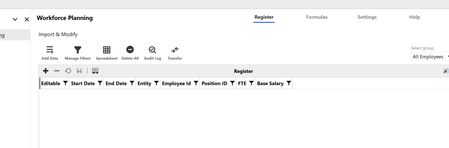
In LIM WF model, I have created register with only 7 fields, Start Date, End Date, Entity, Employee id, Position id, FTE and Base Salary. Created two accounts FTE and Base Salary to copy data to people cube. Now when I am trying to add row, it is not adding any data in but its not showing in register. If i check database table I can see data. Earlier I have uninstalled LIM and WF multiple times to check if the issue gets resolved but still in same place. Any help will be good.2Views0likes0Comments
Extracting O#DirectElim data
Hi Is it possible to extract the O#DirectElim data in OneStream? I have tried this with CubeView and also data management extract job but nothing coming. I could get the data for O#Elimination and also in QuickView for this POV. Thank you, PMMikki4 days agoNew Contributor III42Views0likes1CommentHeadcount calc in LIM WF Model
Is there any way to calculate Headcount where I will use start Data and end date of Current period. If the difference is more than 1 then my HC is 1, I cannot use current period end date in Formula, I tried IIF (DateDiff(month, start date, Current Period)>1,1,0) but it is not giving me any resultYogesh0078 days agoNew Contributor40Views0likes2Comments
List of User Default Home Pages
Hi Folks, Wondering if anyone has built a BR or query to compile a list of Users and their Default Home Page. I know its in the UserAppSettings.xml File within File Explorer under Internal/User, and you can set individuals through the Admin Solution Tools, however I have not found a good way to See what is already set without going to each user individually (that would not be very practical). Appreciate any help! Stephaniesmarshall210 days agoNew Contributor II49Views0likes3CommentsTree incremental load
Hi all, I'm wondering if there's a way to incrementally load a TreeView. I know how to load it in one shot but what if it's supposed to contains a lot of data ? Is there a way to load it incrementally, when a node is clicked (loading the leafs belonging to the node itself and the 1st level nodes under the clicked one) ? Thanks in advance FabioGFabioG10 days agoContributor II20Views0likes0Comments
WorkforcePlanning Revert/Complete Workflow
Hi All, Is there a way to revert the workflow within the solution? We are using the workspace step, and we cannot revert to add more rows to the grid because it remains green once an import has started. Hope to get insights. Thank you.cons111 days agoNew Contributor III36Views0likes0CommentsList of User Default Home Pages
Hi Folks, Wondering if anyone has built a BR or query to compile a list of Users and their Default Home Page. I know its in the UserAppSettings.xml File within File Explorer under Internal/User, and you can set individuals through the Admin Solution Tools, however I have not found a good way to See what is already set without going to each user individually (that would not be very practical). Appreciate any help! Stephaniesmarshall212 days agoNew Contributor II30Views0likes1Comment
Read-Only Cell reason?
I'm trying to help a user load some data for an LRP scenario, but the the years 2027 through 2030 are showing as read-only. All workflows are open, unlocked, and not started for those years, I am an admin, so it's not a security issue, I created a quickview below to show the locked periods: Here's the settings for the scenario: When I look at the cell status for one of the read-only cells, I see this: For extra information, my colleague did perform a DM job that copied data from another scenario into this one for 2027 - 2030 specifically, which are the periods that are read-only. Any insight as to how to fix this so that users can enter data into 2027 - 2030 in this scenario? TIA, Louislrossi116 days agoNew Contributor42Views0likes1CommentLIM (Workforce Planning) Export Configuration
I've exported a configuration via Settings --> Configuration --> Export as denoted on the documentation page. In my build, I've iterated through additional columns, accounts, formulas, etc. The export appears to only include artifacts from my initial build and is omitting anything added after. In the Configuration Header (see below), it's dated 5/4/2026, but I just exported the file today, 5/28/2026. Am I missing a step or was this the intended design? "ConfigurationHeader": { "ProjectCode": "PLN", "HelpAboutVersion": "PV900-SV120", "Version": "1", "ExportDate": "2026-05-04T13:10:33.8337549+00:00", "ExportedSchema": "plnb1", "TypeCode": "B", "TypeLabel": "Workforce Planning", "Instance": 1 },aricgresko17 days agoContributor III30Views0likes0Comments