Recent Discussions

Issue in adding data to LIM WF model
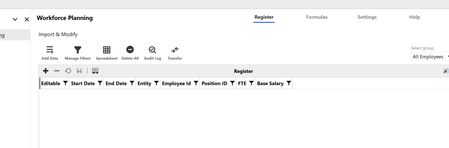
In LIM WF model, I have created register with only 7 fields, Start Date, End Date, Entity, Employee id, Position id, FTE and Base Salary. Created two accounts FTE and Base Salary to copy data to people cube. Now when I am trying to add row, it is not adding any data in but its not showing in register. If i check database table I can see data. Earlier I have uninstalled LIM and WF multiple times to check if the issue gets resolved but still in same place. Any help will be good.2Views0likes0CommentsTree incremental load
Hi all, I'm wondering if there's a way to incrementally load a TreeView. I know how to load it in one shot but what if it's supposed to contains a lot of data ? Is there a way to load it incrementally, when a node is clicked (loading the leafs belonging to the node itself and the 1st level nodes under the clicked one) ? Thanks in advance FabioGFabioG10 days agoContributor II20Views0likes0Comments
WorkforcePlanning Revert/Complete Workflow
Hi All, Is there a way to revert the workflow within the solution? We are using the workspace step, and we cannot revert to add more rows to the grid because it remains green once an import has started. Hope to get insights. Thank you.cons111 days agoNew Contributor III36Views0likes0CommentsLIM (Workforce Planning) Export Configuration
I've exported a configuration via Settings --> Configuration --> Export as denoted on the documentation page. In my build, I've iterated through additional columns, accounts, formulas, etc. The export appears to only include artifacts from my initial build and is omitting anything added after. In the Configuration Header (see below), it's dated 5/4/2026, but I just exported the file today, 5/28/2026. Am I missing a step or was this the intended design? "ConfigurationHeader": { "ProjectCode": "PLN", "HelpAboutVersion": "PV900-SV120", "Version": "1", "ExportDate": "2026-05-04T13:10:33.8337549+00:00", "ExportedSchema": "plnb1", "TypeCode": "B", "TypeLabel": "Workforce Planning", "Instance": 1 },aricgresko17 days agoContributor III30Views0likes0Comments
Error calling a Workspace Business Rule from a different Workspace (Data Management Step)
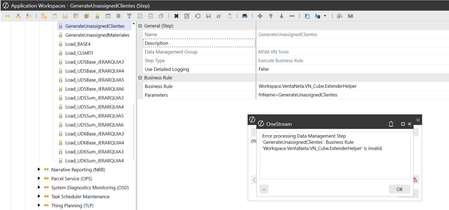
Hello, I am trying to run a Business Rule located in a specific Workspace (VentaNeta) from a Data Management Step that lives in the Default Workspace. According to the OneStream documentation for cross-workspace references, the syntax should be: Workspace.MyWorkspaceNameOrNSPrefix.MyWsAssemblyName.MyShortBRName In my case, I configured it as: Workspace.VentaNeta.VN_Cube.ExtenderHelper However, when running the Data Management Sequence from the Default Workspace, it fails with this error: "Error processing Data Management Step 'GenerateUnassignedClientes'. Business Rule 'Workspace.VentaNeta.VN_Cube.ExtenderHelper' is invalid." Here is the strange part: If I move this exact same Data Management Step inside the VentaNeta Workspace and change the syntax to use Workspace.Current, it executes perfectly: Workspace.Current.VN_Cube.ExtenderHelper Configuration details for the VentaNeta Workspace: Workspace Name: VentaNeta Namespace Prefix: VentaNeta Is Shareable Workspace: True My goal is to keep this DM Step inside a master sequence in the Default Workspace. Has anyone seen this behavior before? Does the "MyWsAssemblyName" token resolve differently when called externally versus using Workspace.Current? Any help would be greatly appreciated!GerardoGoar26 days agoNew Contributor11Views0likes0CommentsEntity-Specific Historical FX Rates for Acquisitions — A More Accurate IFRS Translation
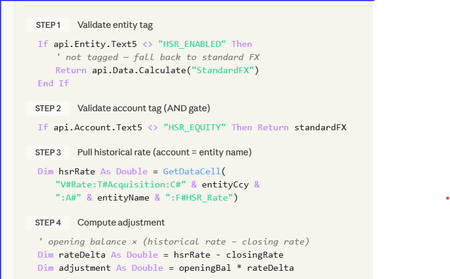
Stop Fighting Your Equity Translation — Let HSR Do the Heavy Lifting A 5-minute read for anyone who's ever stared at a CTA movement and whispered: “Where did that come from?” _____________________________________________________________________________ The consolidation problem we all know It’s day 4 of close. Consolidation runs clean. FX looks fine. Then someone opens the equity rollforward. “Why is acquired share capital moving again?” The entity was acquired years ago at a historical acquisition rate, but the system is retranslating equity at current closing FX every month. CTA absorbs the movement. Auditors ask questions. Finance posts manual journals. Everyone loses time. This is the classic Historical Spot Rate (HSR) challenge. The design principle The goal was simple: Freeze selected equity accounts at acquisition FX rates while keeping the standard OneStream Software translation engine intact. No new cube. No custom dimensions. No complicated override framework. Just: metadata tagging, controlled FX logic, and safe fallback behaviour. The HSR pattern Component Design Entity activation Entity.Text5 = "HSR_Entity" Equity tagging Account.Text15 = "HSR_Accounts" Historic rates Stored in dedicated HSR rate technical accounts Translation logic Finance Business Rule Audit trail Dedicated FX movement flow HSR = Historical Spot Rate. The rule only activates when BOTH: The entity is tagged, and The account is tagged. This creates a simple but effective control framework. The historic rate storage design should remain flexible: use technical accounts, use whatever Text property the project governance model agrees on, and confirm all translation account tagging requirements with the Group Reporting Manager before deployment. What does the rule actually do? Check if Entity is HSR_Entity Check if Account is HSR_Accounts Retrieve stored historic rate Calculate FX adjustment Post adjustment to MVMT_TRANS_FX If anything fails → revert to standard FX That last line is important. The design intentionally prioritises: consolidation stability, auditability, and safe fallback behaviour. If metadata is incomplete or a rate is missing, the application simply reverts to standard FX translation logic. No broken consolidations. No blocked close process. Why did this work well in practice? The biggest advantage was operational simplicity. Adding a newly acquired entity became: Load historic rate Apply metadata tags Run consolidation No code changes required. The approach also kept: CTA cleaner, Equity movements are more stable, And audit support is significantly easier. The real challenge: governance The code itself was straightforward. The harder part was operational discipline: Maintaining 1:1 entity-to-rate mapping Controlling metadata tagging Defining fallback expectations Building reconciliation reporting Testing CTA behaviour thoroughly In my experience, most FX translation problems are not technical problems. They are governance problems. Community question I’d be interested to hear how other certified OneStream Software architects and administrators are handling Historical Spot Rate scenarios. Particularly: Are you using metadata-driven activation? How are you storing historic rates? Have you handled HSR entirely through translation override logic? Any alternative designs that further reduce maintenance? How are you handling CTA transparency and audit reporting? Always interested in seeing cleaner or more efficient approaches from the community.ChrisBriscoe29 days agoNew Contributor III49Views0likes0CommentsXFBR in Assembly to a Data Management Job
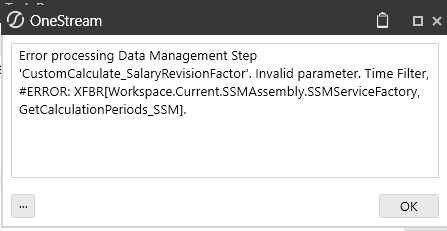
Hi OneStream, I am utilizing the XFBR String Service to add my time filter in my data management job. Before moving to assemblies, I have tested the rule via Business Rule XFBR, and it works. However, when using the XFBR string service, I am having difficulty making it work, as the string I am adding to the time filter is most likely incorrect. I have tried the different approaches based on documentation, but to no avail. Can you please advise how I can fix the issue?cons11 month agoNew Contributor III5Views0likes0CommentsHybrid Scenario Issue: Copying Single Period Without Affecting Prior Months
Hello everyone, I’m encountering an issue with Hybrid Scenarios: I’m trying to copy data for a single period only. While I’ve successfully managed to copy Local data for that specific period by updating calc status, the results become inconsistent from Translated up to Top. To align the data from Translated through to Top in the target scenario, I currently need to run a Force Consolidate. However, doing so also brings in data from previous months, which is not desired. Has anyone faced a similar issue or found a way to restrict the consolidation to a single period without impacting prior periods? Thanks in advance,Hatim_Elhaouma1 month agoNew Contributor II25Views0likes0CommentsOS 9.2 Form Templates Parameters
Hi All, I have a cube view with a set of parameters as a member list. I attach the CV to a form template and override the cube view parameters by using the 'cube view parameters' feature in the form template. As an administrator, I can see the filters I added in the drop-down list, but for the end-user, it is completely blank. (See photo). All dimensions displayed are set to everyone, including templates, cube views, and workspaces. What is causing the issue? In 9.2, the members do not appear in the member list.cons11 month agoNew Contributor III22Views0likes0Comments