The OneStream Community is temporarily frozen until June 29th due to the ongoing maintenance. Please read the blog post here to learn more.
Forum Widgets
Recent Discussions

Lab 2 - 10 Exercise 5C - Create a Quick View using POV from Selected cell
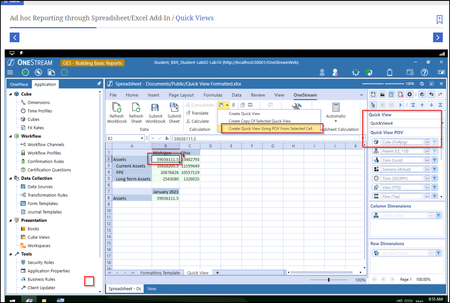
Hi, I have a question. In Exercise 5C of the quick view labs, Below is the screenshot of the quick view source. the POV is using cube FinRptg. But after I created a quick view using POV from selected cell, the new quick view (below), show that the cube is now FinMFG. Why? Why is the cube not the same as above which is FinRptg??JennyTan3 months agoNew Contributor III54Views0likes2Comments
Row Suppression - Building Basic Reports
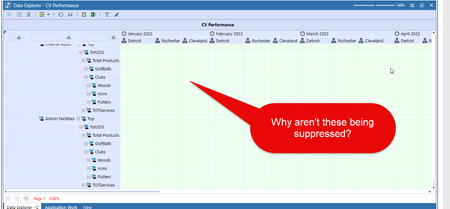
I am working through the lab on building basic reports and went through the session regarding suppressing rows. I have set all of the row suppressions to TRUE (except for parent suppression) in the CV Performance view from the lab, but when displaying the report, it still shows rows with no data, even by scrolling horizontally all the way to the end. Why would this be?SGarno3 months agoNew Contributor37Views0likes1CommentLab 2 - 10 Exercise 5C - Create a Quick View using POV from Selected cell
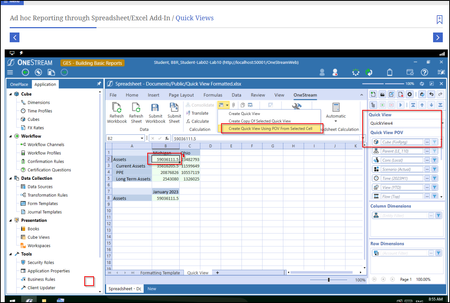
Hi, I have a question. In Exercise 5C of the quick view labs, Below is the screenshot of the quick view source. the POV is using cube FinRptg. But after I created a quick view using POV from selected cell, the new quick view (below), show that the cube is now FinMFG. Why? Why is the cube not the same as above which is FinRptg??JennyTan4 months agoNew Contributor III23Views0likes0Comments
About Lab 3: Suppress No Data Rows Setting
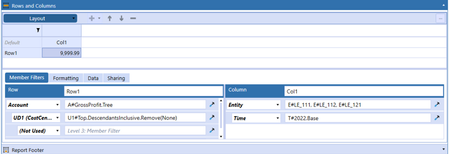
When I took the practice in Lab 3: Cube View Performance, I have a question about Suppress No Data Rows Setting. I noticed that the Row1 has been set the [Suppress No Data Rows] to True, but when running the report, the last two record of the reports still displayed in the result, although there was no data in them. Is it my misunderstand about the setting of Suppress No Data Rows? is there any suggestion? Thanks very much!AleXu5 months agoNew Contributor26Views0likes0Comments
Formatting when Row/Col Sharing
I am practicing building reports via row sharing. I am sharing rows from my income statement into a new report, and I wanted to reformat the header background color, but my change does not work and when I run the report the formatting matches that of my income statement. Is there a way around this?59Views0likes1CommentCan I modify the logo displayed in CV Reports depending on the Entity or other factors (like user ru
Yes. You can write a Cube View Extender in a Finance Business Rule to modify almost anything in a report. You can look for examples in the GolfStream application available from Marketplace.SolvedNoemi8 months agoOneStream Employee406Views0likes1Comment
Unable to progress past Lab 1 in Basic Training and Implementing OneStream courses
Hello, I am currently taking the Basic Training and Implementing OneStream courses, and I’ve encountered an issue where I cannot move to the next page right before Lab1. Another colleague from my company has the same problem, and I’ve also tested it on both my personal and professional laptops, in Chrome and Edge, with the same result. I contacted the OneStream Training Support team yesterday, and they confirmed that they are also experiencing the same issue on their side, so it seems to be a module-level bug. I wanted to check here on the Community forum to see if: -Other users are experiencing the same problem -If there are any updates on when a fix might be available. Thanks in advance for any information or advice!SolvedBMoerman9 months agoNew Contributor60Views0likes1CommentAdditional Member Expansion Functions
What is the difference between Children Children and Descendants?Solvedemma_gore1 year agoNew Contributor349Views0likes1Comment

Tags
- General11 Topics
- Lab Issue6 Topics
- Formatting a Cube View3 Topics
- introduction to reporting3 Topics
- Cubes1 Topic
- Reports1 Topic