Recent Discussions

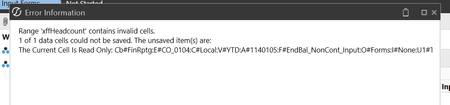
Issue loading form template
Hello, I have been getting the following error trying to load a form template in OneStream I've checked the intersection and it matches the white input cells I am trying to load to. Is there any other reasons this error would appear? Thanksharry_421 hour agoNew Contributor29Views0likes1Comment
Provision Request Manager - Access Issue
Hi All, PRM is used to assign access to the users (adding, removing, adding to groups etc) However, we need a different team to handle the security provision without having access to any other components in OneStream. It seems challenging to provide such group/user who can assign access without having Admin role. Does 6.6 version fix this with the Security updates available in 6.6 or the Provision manager again needs to have the Admin role? Or are there any APIs we can use to modify the users based on requests.
Calculate HC in LIM for Mid-Month Start
Is there an ability to calculate HC expenses that account for when in the month an employee starts and prorate accordingly? As an example, if the employee starts on the 15th then their monthly salary would be Salary / 12 * (15/30). The syntax available in the blocks don't clearly identify if this can be done.tchev3 days agoNew Contributor II22Views0likes0CommentsReorder Register Columns in LIM
Is there an ability to organize a default order for the columns in LIM? I understand the user can customize the order, but we'd like to determine a starting order. Register Definition doesn't give the traditional arrows available to reorder.tchev4 days agoNew Contributor II29Views0likes1Comment
Exporting Grid View Filter Results
Hi OneStream Community, I had a question regarding extracting dimension metadata and properties from OneStream. Currently, when we go to the Dimension Library, apply member filters in the grid view, and then right-click and export to CSV, we can download file containing the metadata along with its properties. I’m trying to find out if there is a way to automate this instead of doing it manually. Ideally, I would like to extract the same information (based on member filters or a specific hierarchy) through something like a Dashboard, Data Management step, or Business Rule, so the export can be automated. Has anyone implemented something similar or know of an approach to achieve this?amritp024 days agoNew Contributor II27Views0likes2CommentsSetLiteralParameterValue issue on web
In our first workflow step, we set the value of a literal parm using dashboard extender and then in next step use that parm in a DM job to export data based on that parm value. On windows client, our DM job works fine but when we try it on web, it does not find the value of the parm and errors out. Can someone please share any experience with this kind of setup and how to make it work on web?TSA_ahmadnaeem6 days agoNew Contributor II29Views1like2Comments
Metadata builder and extensibility
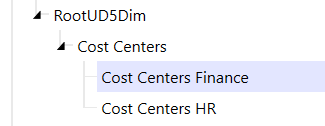
Hi everyone, I am currently using the metadata builder in excel to maintain and keep updated the hierarchies of all dimensions, but I'm having an issue in loading two separate dimensions for UD5. I was planning to build the U5 dimensions as follows: within each dimension, I would have the same base members organized in different hierarchical structures (aka same base members but different nodes between Finance and HR). In Excel, I divided the two dimensions in two separate sheets, because I can reference one dimension at a time in each sheet when I load the XML of the first dimension, I have no issues and the dimension loads as expected. If I make a change to the configuration of that same dimension and load the new xml, I still get no issues. The problem arises when I try to load the XML of the second dimension. The error I get is the following: Error processing XML file type 'Metadata'. Error processing XML. The specified member does not belong to the encompassing dimension. 169989, Cost Centers HR. XML line 127, position 7, element member. The 169989 member is the first base member in the HR dimension. It seems the system refuses to load members that already exist in the Finance dimension. My questions are the following: Is there a problem in the way I designed the UD5 dimensions in excel? OR is it normal that the same base dimension can be loaded for one dimension only, and the second XML (for the HR dimension) should only include the new relationships between the already existing base members and the new nodes of the HR dimension? Thank you in advance for any help, feel free to ask additional info if neededfc6 days agoContributor26Views2likes1Comment
Pivot Grid Modern Browser Experience allow additional default fields
Our team would like an enhancement to the Web version of the client (Version 9.0.0) as the Modern Browser Experience does not allow us to use the default pivot grid views we created. The default pivot grid views we created work great in the Desktop version, but they do not work for our Browser version because we exceed the number of allowed default fields. This enhancement would allow our users to save time with the ability to use default views, instead of needing to add in the fields manually each time.JFenerty11 days agoNew Contributor II81Views4likes5Comments