Recent Discussions

App Copy and System Parameters
Hello, When we refresh a lower environment from our production environment (app copy), the target environment's System Parameters/Secrets are refreshed from the production System Parameters/Secrets. These secrets contain connection strings to another platform and are environment specific. They must remain static. (Fortunately, I export them before a refresh and then re-import them after.) There must be a better way! Does anyone else have this issue? If so, is exporting/importing the System Parameters the only way to keep System Parameters with their correct environments? Thanks!cap081 hour agoContributor6Views0likes1Comment
Select Currency Property for Entity Member
While building the hierarchy using codes, In the Entity Dimension hierarchy "EntityH1", I have a base member as "MyBase". Below code is successfully creating a new child member as "T2" under Parent "MyBase". I am able to set the Text1 property. Can please some one help to suggest how to set Currency property to select a particular currency (Let's take "SGD") 'Set the Dimension Type as Entity Dim objMemberPk As New MemberPk(DimType.Entity.Id, DimConstants.Unknown) 'Update Dim Name accordingly Dim objDim As OneStream.Shared.Wcf.Dim = BRApi.Finance.Dim.GetDim(si, "EntityH1") 'Create New Member Dim objMember As New Member(objMemberPk, "T2", "T2 Entities", objDim.DimPk.DimId) 'Create VaryingMemberProperties object Dim objProperties As New VaryingMemberProperties(objMemberPk.DimTypeId, objMemberPk.MemberId, DimConstants.Unknown) 'Create new member info object for new member Dim objMemberInfo As New MemberInfo(objMember, objProperties, Nothing, objDim, DimConstants.Unknown) 'Modify some member properties. Entity dimension, in this example. Dim entityProperties As EntityVMProperties = objMemberInfo.GetEntityProperties() entityProperties.Text1.SetStoredValue(ScenarioType.Unknown.Id, DimConstants.Unknown, "Test Entity Text1") 'Save the member and its properties. Dim isNew As TriStateBool = TriStateBool.TrueValue BRApi.Finance.MemberAdmin.SaveMemberInfo(si, objMemberInfo, True, True, False, isNew) objMember = BRApi.Finance.Members.ReadMemberNoCache(si, objMemberPk.DimTypeId, "T2") 'Create Parent Child Relationship Dim rowParentID As String = BRApi.Finance.Members.GetMemberId(si, objMemberPk.DimTypeId, "MyBase") Dim relToCreatePk As New RelationshipPk(objMemberPk.DimTypeId, rowParentID, objMember.MemberId) Dim relToCreate As New Relationship(relToCreatePk, objMember.DimId, RelationshipMovementType.InsertAsLastSibling, 1) Dim relToCreateInfo As New RelationshipInfo(relToCreate, Nothing) Dim relPostionOpt As New RelationshipPositionOptions(RelationshipMovementType.InsertAsLastSibling, 1) brapi.Finance.MemberAdmin.SaveRelationshipInfo(si, relToCreateInfo, relPostionOpt)sonuanand17 hours agoNew Contributor13Views0likes0Comments
Missing underscore in member names displayed via combo box
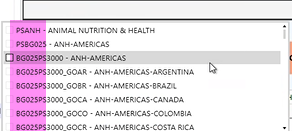
Hello! We have a missing underscore in a combo box and I'm not exactly sure why... Here's what shows: Here's how entities are set up: Anyone see this before? Seems related to this one which says it's resolved in 7.1.3 but I'm not seeing that: Underscore in member name not displaying in multiselect listbox | OneStream CommunityNicoleBruno1 day agoValued Contributor44Views0likes2Comments JaredGreengrass4 days agoNew Contributor1.4KViews7likes2Comments
Workforce Planning | Invalid Column Name
I'm receiving the following error when trying to add additional Register Definitions. During the build, I've added new Register fields as requirements evolve but now am facing this error when running the Update button. Has anyone run into this issue and resolved it? Error executing Workspace Assembly Service class 'Workspace.PLNB1.CustomEventHandler_PLN.WsAssemblyFactory'.Invalid column name 'PayGroup'. Invalid column name 'Location'. Invalid column name 'EmpStatus'. (SQL Error Number -2146232060, 207, 207, 207). User Interface Stack Trace: at OneStream.Client.Api.DashboardsAjaxServiceReference.DashboardsAjaxServiceClient.StartExecuteSelectionChangedServerTaskCompressed(SessionInfo si, Boolean isSystemLevel, Guid primaryDashboardID, Guid embeddedDashboardID, Guid componentID, PageInstanceInfo pageInstanceInfo, XFSelectionChangedServerTaskInfo serverTaskInfo) at OneStream.Client.SharedUI.DashboardWcfHelper.ExecuteSelectionChangedServerTaskAsync(SessionInfo si, Boolean isSystemLevel, Guid primaryDashboardID, Guid embeddedDashboardID, Guid componentID, PageInstanceInfo pageInstanceInfo, XFSelectionChangedServerTaskInfo serverTaskInfo, OnAfterExecuteSelectionChangedServerTaskDelegate onAfterExecuteSelectionChangedServerTask, Object userState)aricgresko4 days agoContributor III47Views0likes1Comment
Next month Data not showing reversal of YTD
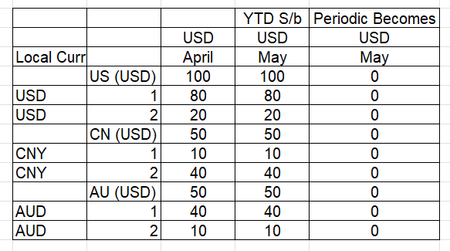
In consolidation system in the month after close example if we close April , May should show reversal of April. Please see below screen shots of how system is should show up and how it is showing. We tried clearing base data through data management. Any ideas would be helpful. Normally However the system is doingNarang4 days agoNew Contributor31Views0likes1CommentCalculate HC in LIM for Mid-Month Start
Is there an ability to calculate HC expenses that account for when in the month an employee starts and prorate accordingly? As an example, if the employee starts on the 15th then their monthly salary would be Salary / 12 * (15/30). The syntax available in the blocks don't clearly identify if this can be done.Solvedtchev5 days agoNew Contributor III199Views0likes5Comments
Exclusion Groups - Uses / Best Practices
Hi Folks, Wondering if anyone has any use cases for the Exclusion Groups. How did you use, what quirks did you run into? Does anyone have any documentation on Best Practices? (Other than the knowledge article in ServiceNow). Thank You!smarshall26 days agoNew Contributor II42Views0likes1Comment Tinamwelch7 days agoNew Contributor II85Views0likes4Comments
Inconsistent File Opening from Dashboard → File Explorer (Windows Client)
Hi everyone, I’m hoping to check if anyone has experienced something similar. We have a dashboard that directs users to folders in File Explorer. The navigation itself works as expected and correctly opens the folder location. However, users are experiencing inconsistent behavior when trying to open files from there — sometimes the files open normally, and other times nothing happens (no error message). If users navigate directly through File Explorer and open the same file, it works without any issues. This is happening in the OneStream Windows desktop application (not browser), and permissions don’t appear to be the issue since access works normally outside the dashboard. Has anyone encountered similar behavior when launching files from a dashboard? If so, was this a known issue or did you find an effective workaround? Appreciate any insights — thank you!Eve_Pereira8 days agoNew Contributor II34Views0likes1Comment