Recent Discussions

Reorder Register Columns in LIM
Is there an ability to organize a default order for the columns in LIM? I understand the user can customize the order, but we'd like to determine a starting order. Register Definition doesn't give the traditional arrows available to reorder.tchev1 hour agoNew Contributor16Views0likes1Comment
Exporting Grid View Filter Results
Hi OneStream Community, I had a question regarding extracting dimension metadata and properties from OneStream. Currently, when we go to the Dimension Library, apply member filters in the grid view, and then right-click and export to CSV, we can download file containing the metadata along with its properties. I’m trying to find out if there is a way to automate this instead of doing it manually. Ideally, I would like to extract the same information (based on member filters or a specific hierarchy) through something like a Dashboard, Data Management step, or Business Rule, so the export can be automated. Has anyone implemented something similar or know of an approach to achieve this?amritp0223 hours agoNew Contributor II23Views0likes2CommentsSetLiteralParameterValue issue on web
In our first workflow step, we set the value of a literal parm using dashboard extender and then in next step use that parm in a DM job to export data based on that parm value. On windows client, our DM job works fine but when we try it on web, it does not find the value of the parm and errors out. Can someone please share any experience with this kind of setup and how to make it work on web?TSA_ahmadnaeem2 days agoNew Contributor II28Views1like2Comments
Metadata builder and extensibility
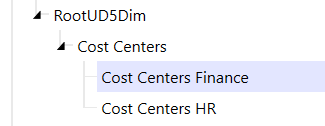
Hi everyone, I am currently using the metadata builder in excel to maintain and keep updated the hierarchies of all dimensions, but I'm having an issue in loading two separate dimensions for UD5. I was planning to build the U5 dimensions as follows: within each dimension, I would have the same base members organized in different hierarchical structures (aka same base members but different nodes between Finance and HR). In Excel, I divided the two dimensions in two separate sheets, because I can reference one dimension at a time in each sheet when I load the XML of the first dimension, I have no issues and the dimension loads as expected. If I make a change to the configuration of that same dimension and load the new xml, I still get no issues. The problem arises when I try to load the XML of the second dimension. The error I get is the following: Error processing XML file type 'Metadata'. Error processing XML. The specified member does not belong to the encompassing dimension. 169989, Cost Centers HR. XML line 127, position 7, element member. The 169989 member is the first base member in the HR dimension. It seems the system refuses to load members that already exist in the Finance dimension. My questions are the following: Is there a problem in the way I designed the UD5 dimensions in excel? OR is it normal that the same base dimension can be loaded for one dimension only, and the second XML (for the HR dimension) should only include the new relationships between the already existing base members and the new nodes of the HR dimension? Thank you in advance for any help, feel free to ask additional info if neededfc2 days agoContributor20Views2likes1Comment
Pivot Grid Modern Browser Experience allow additional default fields
Our team would like an enhancement to the Web version of the client (Version 9.0.0) as the Modern Browser Experience does not allow us to use the default pivot grid views we created. The default pivot grid views we created work great in the Desktop version, but they do not work for our Browser version because we exceed the number of allowed default fields. This enhancement would allow our users to save time with the ability to use default views, instead of needing to add in the fields manually each time.JFenerty7 days agoNew Contributor II81Views4likes5Comments
Percent Consolidation Behavior
Hi, We are currently attempting to exclude a specific entity from the main consolidation process for reporting purposes. This entity is no longer within scope, but we would like to keep it in its current position in the hierarchy to preserve historical data. We also need to continue importing data into this entity for reporting purposes. Our objective is to set the consolidation percentage to 0% so that it no longer consolidates going forward. After updating the Percent Consolidation to 0%, we are not seeing any impact. The entity continues to consolidate in the application. For context, the Ownership Type is set to Full Consolidation and the Consolidation Algorithm Type is set to Custom. Is this expected behavior? If so would you have any workaround solution ? Thank you for the feedback and help!SolvedGhizlane7 days agoNew Contributor II80Views0likes5CommentsTabbed Dashboard
Hi, I have Dashboard with tabbed embedded reports. for example, MainDashboard - Tab1, Tab2, Tab3. Everything works fine when the user clicks on Tab of their choice for the fiscal year 2026. For Historical data I would like to show the same report for with changed tab. for example, MainDashboard - Tab1, Tab2, Tab4 for the he fiscal year 2025. If the user changes the Scenario from 2026 to 2025 or vice versa the dashboard report tab3/tab4 shows/hide based on FY. How can I achieve at the workflow level? Any help will be appreciated. Thanks.navdy9 days agoNew Contributor21Views0likes0Comments
Inconsistent File Opening from Dashboard → File Explorer (Windows Client)
Hi everyone, I’m hoping to check if anyone has experienced something similar. We have a dashboard that directs users to folders in File Explorer. The navigation itself works as expected and correctly opens the folder location. However, users are experiencing inconsistent behavior when trying to open files from there — sometimes the files open normally, and other times nothing happens (no error message). If users navigate directly through File Explorer and open the same file, it works without any issues. This is happening in the OneStream Windows desktop application (not browser), and permissions don’t appear to be the issue since access works normally outside the dashboard. Has anyone encountered similar behavior when launching files from a dashboard? If so, was this a known issue or did you find an effective workaround? Appreciate any insights — thank you!Eve_Pereira10 days agoNew Contributor II7Views0likes0Comments