Recent Discussions

ShowCurrency=True in excel export?
Hi, I can figure out how to solve problem with cell format in column ShowCurrency=True (in Cube View) to work in Excel export? Any ideas how to fix this? I want to have it both in Excel and PDF export. In Excel formatting I cannot see any settings that I can use. Maybe some kind of combination in ExcelNumberFormat that can be used? Currency is depended on accounts etc. Thanks for your help, PiaPiaR2 days agoNew Contributor9Views0likes0Comments
Excel Add-in and Task Activity Log
Hello, I'm responding to audit requests regarding user task activities and found an active user which has no task activity logged. The user uses the Excel Add-in. What Excel activities are/aren't recorded on the Task Activity log? Is there a way to capture the Excel activities? Thanks!cap083 days agoContributor24Views0likes1Comment
Genesis Upgrade
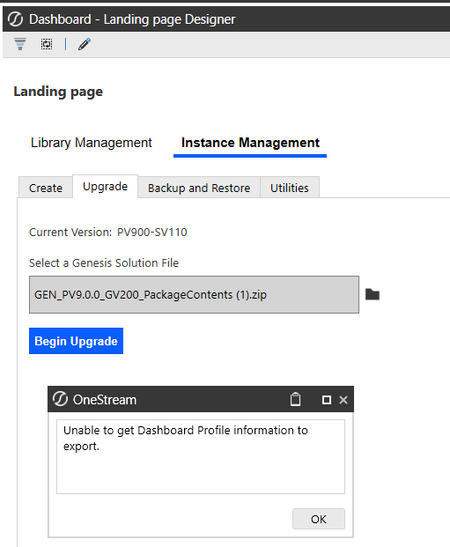
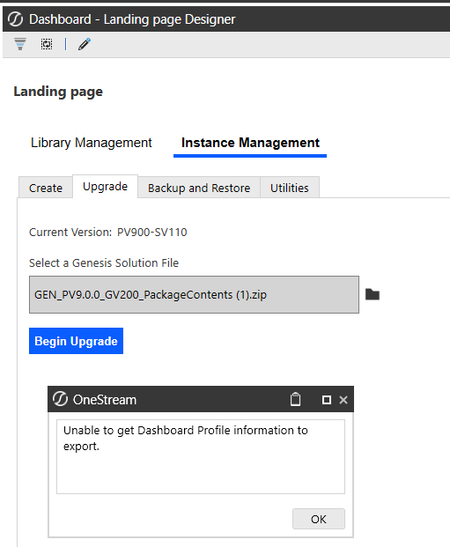
Hi all, I’m currently upgrading instances of Genesis-created workspaces and ran into an issue. The workspace named "Genesis" was upgraded successfully. However, the ones with different names are failing and returning the error below. For example, one of the affected workspaces is named "Landing Page." I’m not sure if the naming is related to the issue, but it’s the main difference I’ve noticed so far. Has anyone encountered something similar or knows how to resolve this? I’d really appreciate any guidance.Solvedcons112 days agoNew Contributor III65Views0likes2Comments- cons112 days agoNew Contributor III38Views0likes1Comment
Genesis error when trying to edit new blocks: Unable to find 'WSMU'
hi folks, When trying to edit some new blocks I've added in Genesis, I'm getting the error "Unable to find the Workspace Assembly Service Factory class for name 'WSMU' in Workspace 'Genesis' and Maintenance Unit 'X'" any idea why? I'm getting the error when i try to load a 'cube view basic' or 'embedded label' so far, in a card in a row in an advanced formatting blockSolvedkeski18 days agoNew Contributor II78Views0likes3Comments
Event Listeners / Custom Control in a Dynamic Dashboard
Hello, To standardize the look and feel of my dashboards, I would like to create a reusable dashboard template for a toolbar. The Menu component seems well suited for this purpose. However, some actions (for example, Save) cannot be defined at the menu item level and are only available at the menu component level. As a workaround, I am using Event Listeners: each menu item sends a parameter value, which is then used as the Event Listener name. This allows me to have one menu item that performs a Save action, another that launches a business rule, another that opens a dialog, etc. This approach works fine until the Custom Control dashboard is embedded in a Dynamic Dashboard. The issue can be easily reproduced by embedding the dashboards described in this blog post into a dynamic dashboard. Any help or guidance would be greatly appreciated. Thanks in advance.RaphaelV18 days agoNew Contributor II77Views0likes2CommentsSubmitting zero in excel
I am trying to submit zero via excel add-in using XFGetCell formula into MTD/periodic view. Excel/Spreadsheet does not seem to allow it. I can put in zero into the same POV via a data form. The only workaround I have is to submit a 0.0001 record into OS via excel XFGetCell formula instead. Is there any proper change in setting that would allow me to do this?SolvedFionaG20 days agoNew Contributor73Views0likes3Comments
Cubeview header rows
I have a cubeview with a header row returning no data for all my time period columns (correct) but returning (100.0)% for columns where I'm calculating percent variances. Is there a way to make those columns blank as well for my header row?Michael_Laroche24 days agoNew Contributor II37Views0likes1Comment
MTD values in cube view
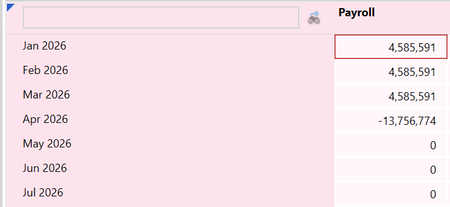
Hi all, my client is loading in OS Actual data in MTD. I set up a cube view to show the actuals MTD month by month. If the user loads the first 3 months, the cv correctly shows the MTD for the first 3 months, but for the 4th month it shows the YTD with inverted sign: If I understand correctly, this setup should be configurable by intervening on the following WF Profile settings: I also changed the following setting in the scenario configuration: nevertheless, the cv keeps showing the inverted YTD in the new month. Can anyone explain why? Thank you!fc29 days agoContributor24Views0likes0Comments